Configure LDAP Integration
Deepser natively supports integration with the LDAP protocol, which provides centralized resource management. This guide walks you through configuring LDAP integration to import users and groups into Deepser from an existing LDAP installation.
Deepser synchronizes resources with LDAP in read-only mode and can independently manage the update of states or modified parameters on the LDAP controller. This means that if a user is moved to a group, disabled, or otherwise changed on the LDAP controller, those same changes will be replicated in Deepser under standard conditions.
Create an LDAP Integration
To configure an LDAP integration in Deepser, follow these steps:
- Go to System > Permission > LDAP Integration.
On the screen that opens, you can view already-configured LDAP integrations and set up new ones.
- Click the Add LDAP button.
The following screen will open:
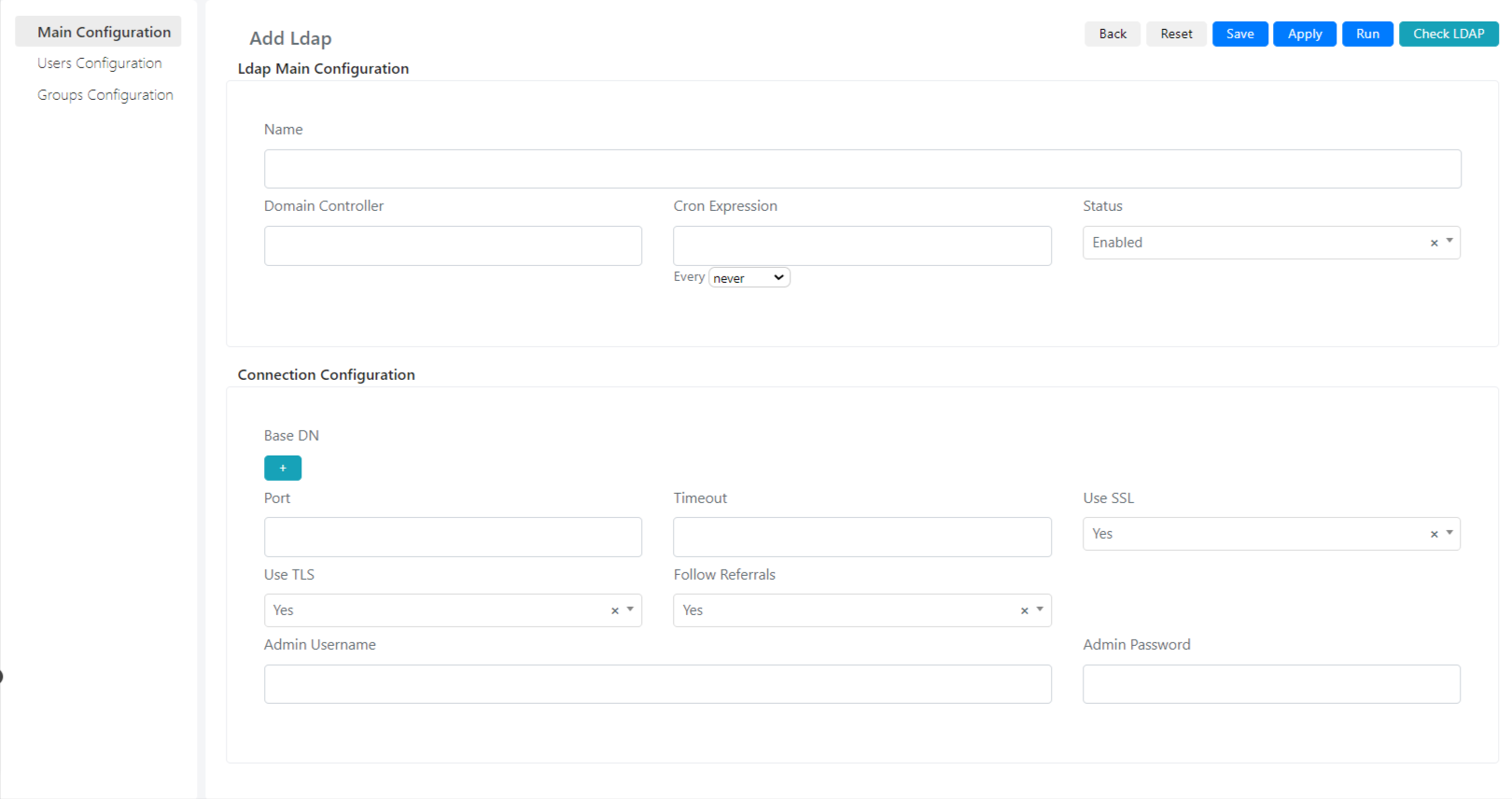
- Fill in the fields described below:
| Field | Description |
|---|---|
| Show In Login | Indicates whether this LDAP integration will be visible on the login page |
| Is Default | Indicates whether this LDAP integration will be selected by default in the list on the login page |
| Name | LDAP Integration Name |
| Domain Controller | The address of the domain controller |
| Cron Expression | Cron expression that defines how often the synchronization runs |
| Status | Indicates whether this integration is active. If inactive, synchronization will not run. |
| Base DN | Domain base name. This field indicates the point below which Deepser will have visibility in the domain forest. |
| Time-out | Maximum time before an unanswered request is considered expired |
| Use SSL | Indicates whether the domain controller uses SSL encryption |
| Use TLS | Indicates whether the domain controller uses TLS encryption |
| Follow Referrals | Indicates whether to follow referral links generated by the LDAP controller. Referral links indicate that the queried server does not directly own the requested resource but has a reference to the server or domain that does. |
| Admin Username | Username of the account that Deepser uses to read domain users |
| Admin Password | Password of the account that Deepser uses to access the Domain Controller |
Users Configuration
In the Users Configuration section, you define how users are synchronized in Deepser.
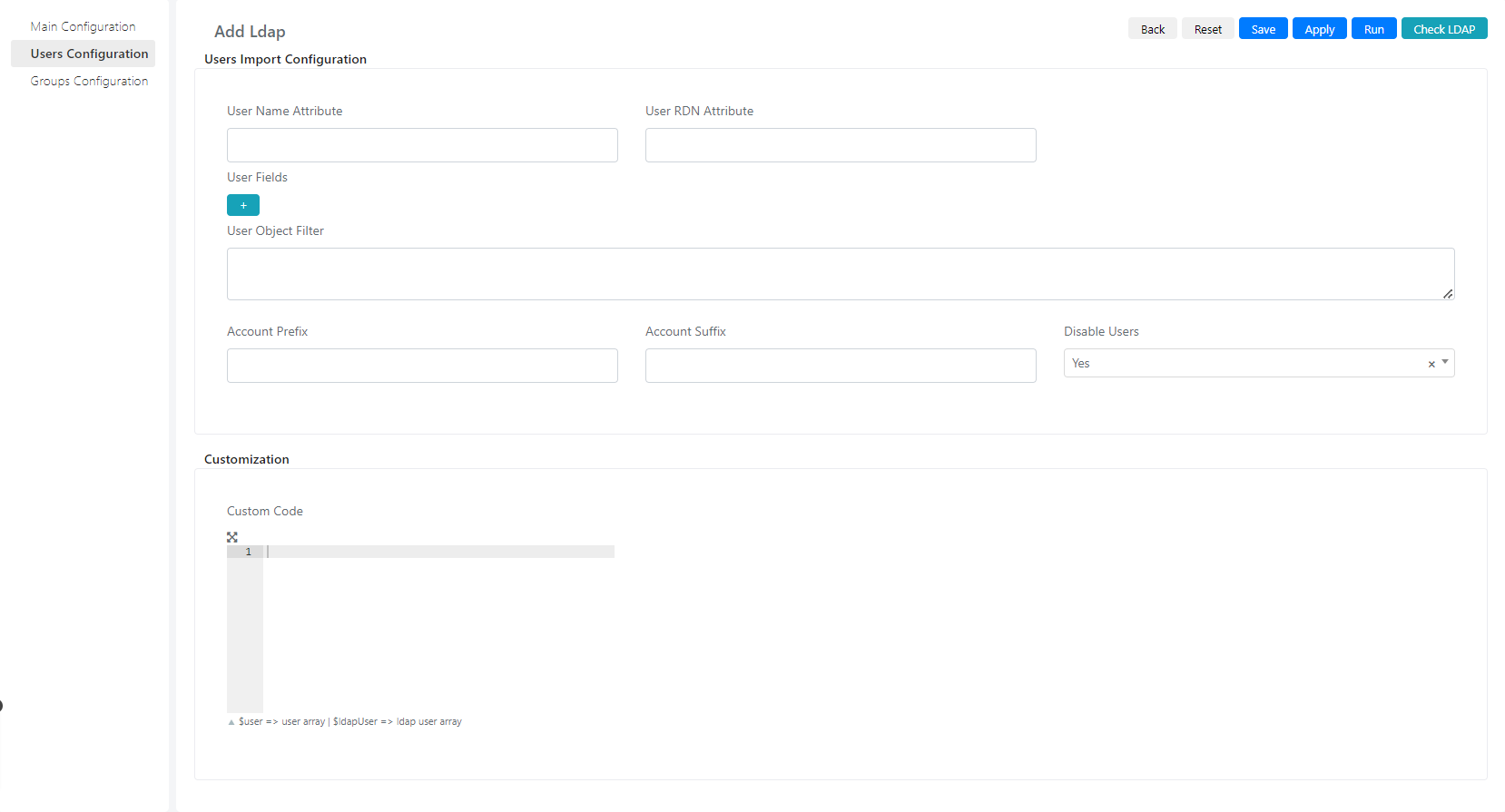
| Field | Description |
|---|---|
| User Name Attribute | Indicates which field in the domain controller response contains the user's name |
| User RDN Attribute | The field that indicates the path relative to another entity (parent) of the resource in the domain forest (e.g., distinguishedname) |
| User Fields | Maps the relationship between domain user fields and user fields in Deepser |
| User Object Filter | An LDAP query used as a filter to retrieve only users who match the search criteria |
| Account Prefix | Account prefix, e.g., "EXAMPLE<username>". In this case "EXAMPLE" is the account prefix. |
| Account Suffix | Account suffix, e.g., " |
| Disable Users | Indicates whether users created as disabled on AD should be imported as disabled |
| Custom Code | Custom code that defines how user field values imported from integration are assigned |
Groups Configuration
In the Groups Configuration section, you define how groups are synchronized in Deepser.
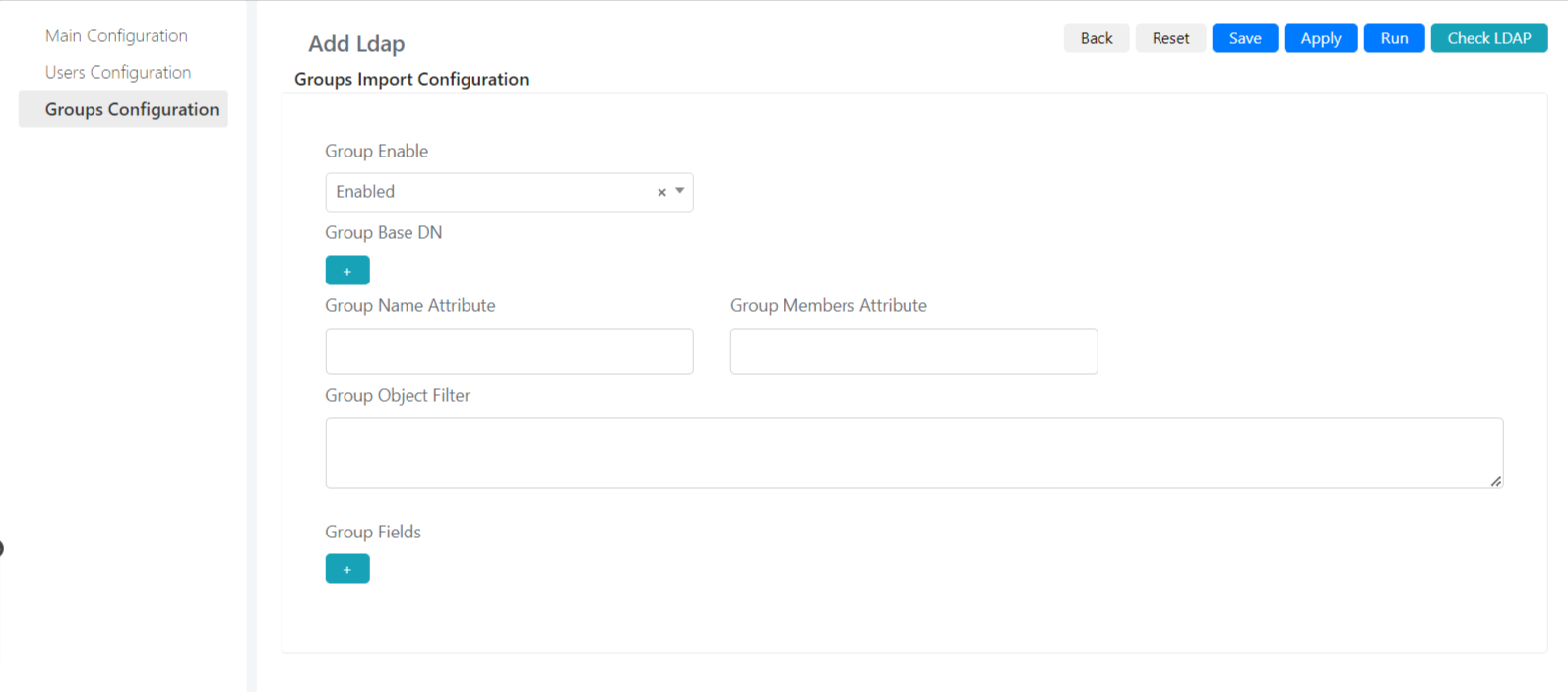
| Field | Description |
|---|---|
| Group Enable | Enables the import of groups into Deepser from the forest |
| Group Base DN | The base domain name in which the groups reside (e.g., cn=exemple, dn=com) |
| Group Name Attribute | Indicates which field in the object returned by the domain controller contains the group name |
| Group Members Attribute | Indicates which field in the object returned by the domain controller contains the list of users who belong to the group |
| Group Object Filter | An LDAP query used as a filter to retrieve only groups that match the search criteria |
| Group Fields | Maps domain group fields to group fields in Deepser |
- Once you have configured the fields, click Save or Apply.
Click the Check LDAP button to verify that the integration works correctly. A green banner in the upper right corner confirms a successful connection. A red banner indicates an error.