Define Group Permission Rules
You can define rules for permission management using PHP code, from the simplest to the most complex. This page walks you through the rule configuration form and provides examples for common scenarios such as controlling create, delete, edit, read, and grid permissions.
Access the Rule Configuration
Once positioned in the Rules configuration form, expand the scripting area by clicking on the </> icon in the G Expression field.
Inside that area, you can define a rule using PHP code.
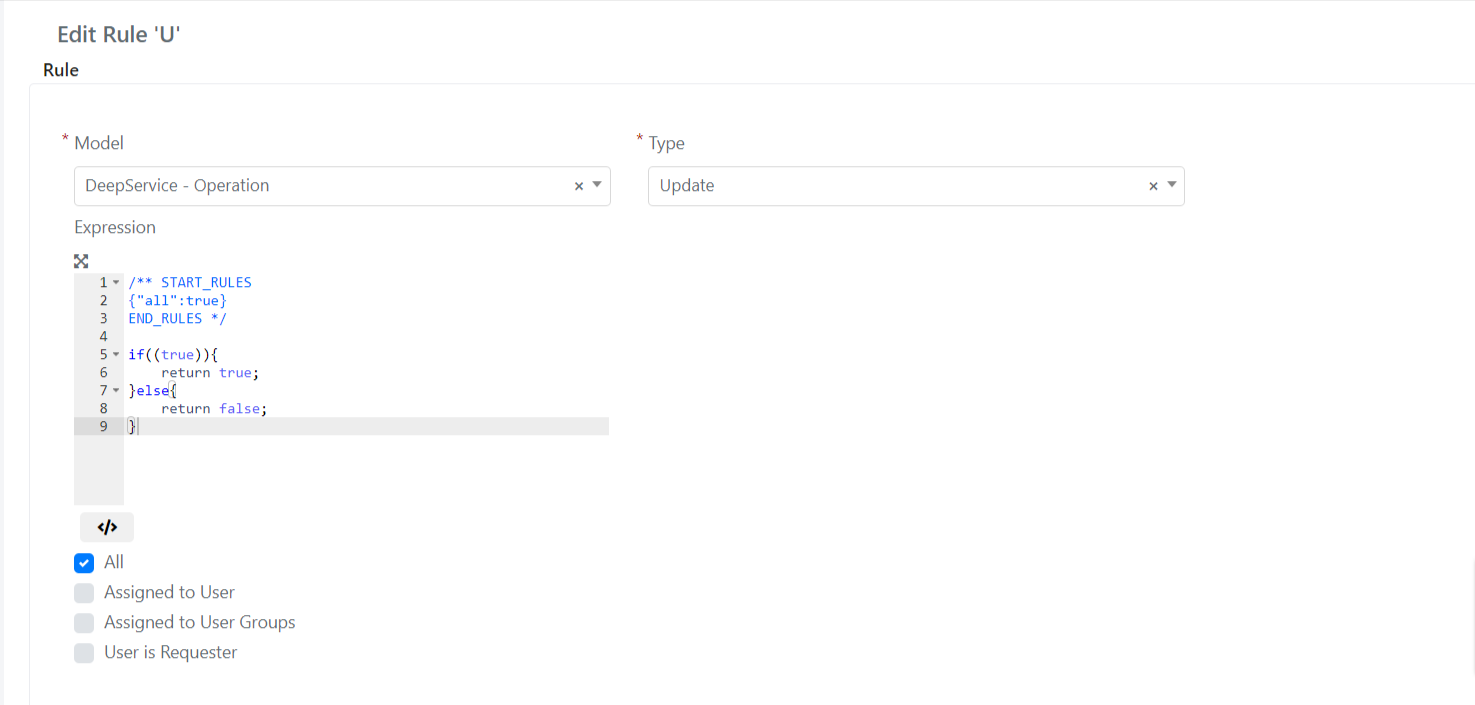
Example: Define Custom Rules for a Group
In this example, you want a group of users to be able to:
- Create Service Operations;
- Delete only the Service Operations assigned to their user (Assigned To);
- Modify Service Operations sent by a specific user group;
- View details only of the Service Operations assigned to their Assigned Group;
- Display in the grids only the Service Operations assigned to their user groups (Assigned Group).
To accomplish these requirements, you need to define 5 distinct rules.
Rule 1: Manage Creation
To allow users to create Service Operations, define a rule with Create Type, DeepService-Operations Model, and insert the following PHP code:
return true;
Rule 2: Manage Cancellation
To allow users to delete only the Service Operations assigned to their user, define a rule on the DeepService-Operations Model with Type Delete that verifies the current user is also the assigned user of the operation.
Insert the following code:
//retrieve the assigned user username
$assignedUsername = $model->getAssignedUsername();
//retrieve the current user
$currentUser = Deep::helper('deep_admin')->getCurrentUser();
//operation has an assigned user and assigned user is the current user then allow delete action
if ($assignedUsername && $assignedUsername == $currentUser->getUsername())
    return true;

return false;
Rule 3: Manage Editing
To allow users in the group to modify Service Operations sent by a specific user group, define a rule on the DeepService-Operations Model with Update Type that verifies the requester is a member of a specific group.
Insert the following code:
//retrieve the requester user object instance
$requester = $model->getRequesterUser();
//if requester user is member of customers group then allow the update action
if ($requester && $requester->isInGroup('Customers'))
    return true;

return false;
Rule 4: Manage the Display
To allow users to view details only of the Service Operations assigned to their own user groups, define a rule on the DeepService-Operations Model of Type Read that verifies the current user belongs to the assigned group.
Insert the following code:
//retrieve the assigned group id
$assignedGroup = $model->getAssignedGroupId();
//retrieve the current user
$currentUser = Deep::helper('deep_admin')->getCurrentUser();
//if the current user is a member of the assigned group then allow viewing operation details
if ($assignedGroup && $currentUser->isInGroup((int)$assignedGroup))
    return true;

return false;
Rule 5: Manage the Display in Grids
To allow users to display in the grids only the Service Operations assigned to groups they belong to, define a rule on the DeepService-Operations Model of Grid Type that verifies the current user belongs to the assigned group.
In this case, acting on the grid, add a filter to the query that retrieves records from the database.
//retrieve the current user
$currentUser = Deep::helper('deep_admin')->getCurrentUser();
//add a filter to the DB query on assigned group
//assigned group must be in the array returned by $currentUser->getGroupIds()
$collection->addFieldToFilter(
    'assigned_group_id', ['in' => $currentUser->getGroupIds()]
);