Visibility Management and Roles
In Deepser, visibility is managed through four main elements: the Requester field, Roles, Companies, and Groups. Each element controls a different aspect of what users can see and access within the platform. This article provides an overview of how these elements interact to determine user visibility.
The Requester Field
The Requester field indicates who requested the Service Operation. Deepser uses this field to set visibility of Service Operations for end users, unless the user is a Company Supervisor or an Empowered User.
Roles
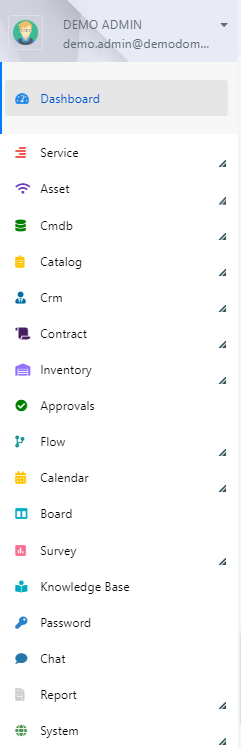
In Deepser, roles define which resources a user can access. You can think of roles as managing vertical visibility -- that is, the visibility of the modules presented in the sidebar.
Predefined Roles
The default roles in Deepser are:
| Role | Description |
|---|---|
| Administrator | Administrator users in Deepser have global access and bypass visibility limits in the Deepser Backend. They can modify grids and form templates. This is the only role that has access to system configurations and the System tab. Super Admin users are Administrators who have set "All" in the resource visibility section, granting access to scripting areas. |
| Operator | These users can modify grids and form templates, but they do not have access to scripting areas or the modules in the System tab. By default, they have global access to all other modules. |
| Key Users | These users are comparable to Operators, but unlike them, they cannot modify any system configuration, including grids and form templates. |
| Users | These are end users. By default, they do not have access to the Deepser Backend but only to the User Portal. They cannot change any system configuration or see Service Operations that were not opened by them. If you need an end user to see Service Operations not opened by themselves, you can set them as a Company Supervisor or configure them as an Empowered User. |
Companies
In Deepser, companies are very important for managing visibility. A company represents a real-world company, or it can represent a department (for example, within a very large and structured organization).
Companies limit the visibility of Service Operations and other entities so that items created by a company are generally only visible to users of that company or users who have that company among their additional companies. Any user who tries to open a Service Operation or interact with an entity that does not belong to their company will receive an "Access Denied" error.
Groups
Groups in Deepser allow you to manage entity visibility for groups of users. For each Deepser entity, you can define which groups have visibility on that resource. All other groups will not see it.
In addition to specific groups, you can assign the pseudo group "All Groups" to a resource. As the name suggests, this makes the resource visible to all groups.
If a user belongs to multiple groups and at least one of those groups has visibility on a resource, the resource will be visible to that user.