Set Up Escalation Rules for Contracts
Escalation rules let you send automated email notifications before a contract expires. This guide walks you through the three components you need to configure: an email template, an escalation rule, and an email event.

Step 1: Create an Email Template
-
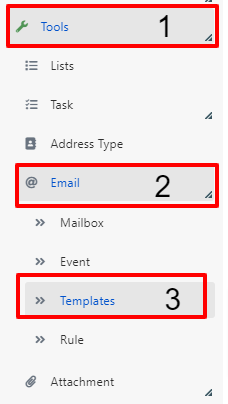
In the Deepser Backend, go to System > Tools (1) > Email (2) > Templates (3).
-
Click the Add Mail Template button.

-
Fill in the template fields as indicated below.
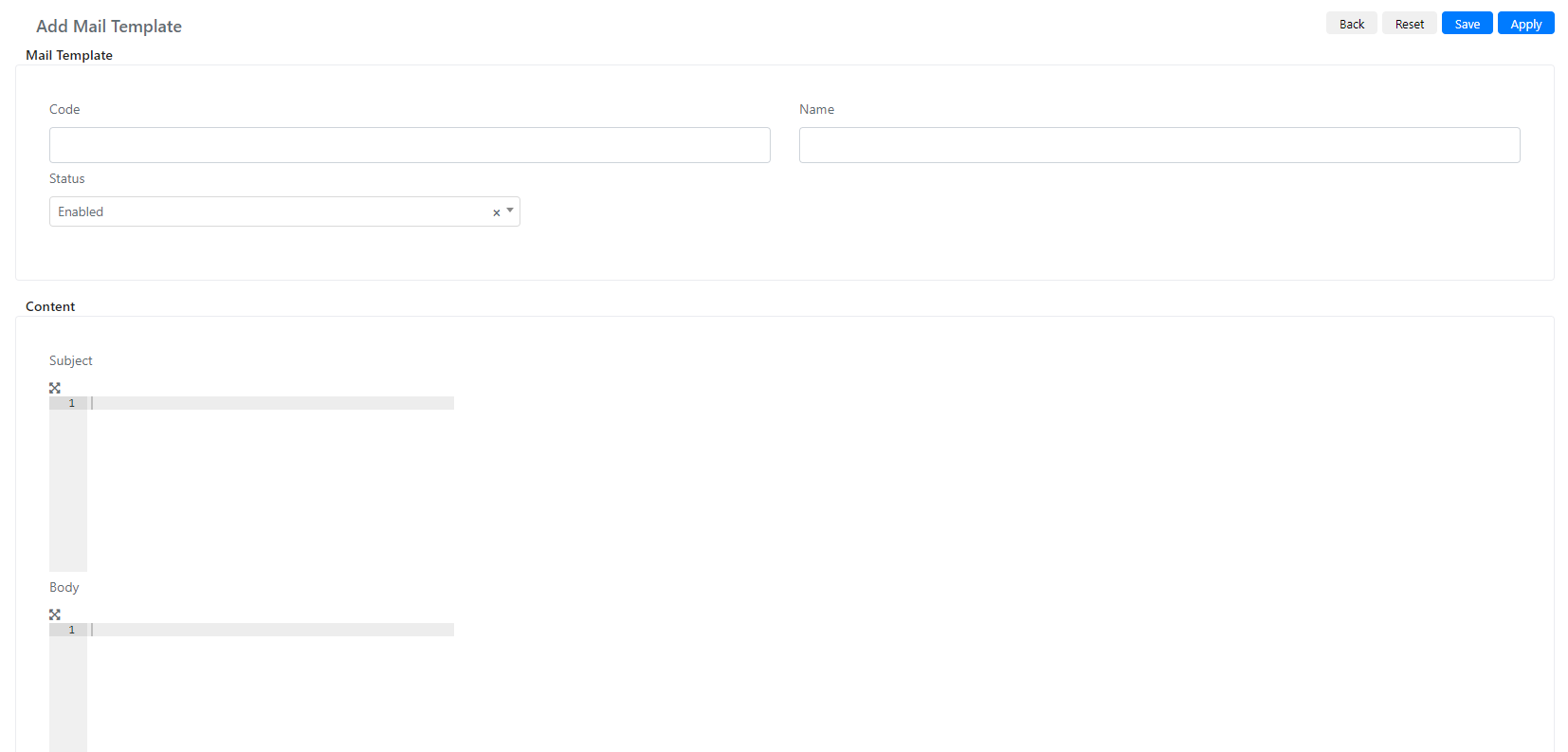
| Field | Value | Note |
|---|---|---|
| Name | Alert contract expiration | Can be changed. |
| Code | alert_contract_expiration | Can be changed. |
| Status | Enabled |
Subject:
<?php
$contract = $this->getModel();
$customerName = Deep::getModel('deep_company/company')->load($contract->getCustomerCompanyId())->getName();
$nrContratto = $contract->getContractNumber();
$expirationDate = new Zend_Date(Deep::helper('deep_calendar')->convertDateToUserTimezone($contract->getExpirationDate(), Mage::app()->getLocale()->getDateTimeFormat(Mage_Core_Model_Locale::FORMAT_TYPE_SHORT), Deep::app()->getLocale()->getLocale()));
$expiringDate = $expirationDate->get('dd/MM/YYYY');
?>
<?php echo $customerName." - ". Deep::helper('deep_email')->__('Contract Nr.').$nrContratto." - ".Deep::helper('deep_email')->__('expiring on:')." ".$expiringDate; ?>
Body:
<?php
$contract = $this->getModel();
$nomeContratto = $contract->getName();
$nrContratto = $contract->getContractNumber();
$expiringDate=new DateTime();
$expiringDate=$expiringDate->createFromFormat('Y-m-d H:i:s',$contract->getExpirationDate());
$expiringDate->setTimezone(new DateTimeZone('Europe/Rome'));
$expiringDate=$expiringDate->format('d/m/Y');
$url = Deep::getUrl('adminhtml/contract_contract/edit', ['id' => $contract->getId()]);
?>
<?php $this->includeTemplate("header") ?>
<!-- Start of Main Content -->
<tr style="">
<td bgcolor="#FFFFFF" align="center" style="">
<table width="100%" align="center" cellpadding="0" cellspacing="0" border="0" class="devicewidth" style="">
<tbody style="">
<!-- Start Spacer -->
<tr>
<td class="w22" width="41" style="font-size:1px; line-height:1px;"> </td>
<td class="h26" height="36" style="font-size:1px; line-height:1px;"> </td>
<td class="w22" width="41" style="font-size:1px; line-height:1px;"> </td>
</tr>
<!-- End Spacer -->
<tr style="">
<td class="w22" width="41" style="font-size:1px; line-height:1px;"> </td>
<td class="mktEditable content mktEditable content" id="edit_text_1" valign="middle" style="font-family:Calibri, Helvetica, sans-serif; font-size:16px; color:#505050; text-align:left; line-height:25.6px; font-weight:normal; text-transform:none;">
<p>
<br>
<?php echo Deep::helper('deep_email')->__('The contract number')?> <b style="font-weight: 700;"><a href="<?php echo $url ?>"><?php echo $nrContratto ?></a></b> - <?php echo $nomeContratto; ?>
<?php echo Deep::helper('deep_email')->__('expires on:')?> <?php echo $expiringDate; ?><br>
<br>
</p>
</td>
<td class="w22" width="41" style="font-size:1px; line-height:1px;"> </td>
</tr>
<!-- Start Spacer -->
<tr>
<td class="w22" width="41" style="font-size:1px; line-height:1px;"> </td>
<td height="30" style="font-size:1px; line-height:1px;"> </td>
<td class="w22" width="41" style="font-size:1px; line-height:1px;"> </td>
</tr>
<!-- End Spacer -->
</tbody>
</table>
</td>
</tr>
<!-- End of Main Content -->
<!-- End of Main Content -->
<?php $url = Deep::getUrl('adminhtml/contract_contract/edit', ['id' => $contract->getId()]); ?>
<!-- start of Button -->
<tr style="">
<td bgcolor="#FFFFFF" align="center" class="mktEditable" id="edit_cta_button" style="">
<table width="100%" border="0" cellspacing="0" cellpadding="0">
<tbody>
<tr>
<td class="w22" width="41" style="font-size: 1px; line-height: 1px;"> </td>
<td align="left">
<table class="button" cellpadding="0" cellspacing="0" border="0" align="left" bgcolor="#0080ff" style="-webkit-border-radius: 4px; -moz-border-radius: 4px; border-radius: 4px;">
<tbody>
<tr>
<td width="518" align="center" valign="middle" height="65">
<span style="color: #ffffff; text-decoration: none;">
<a class="mobButton mktNoTok" href="<?php echo $url ?>" style="font-family: Calibri, Helvetica, sans-serif; font-size: 16px; color: #ffffff; display: block; height: 65px; mso-line-height-rule: exactly; line-height: 65px; font-weight: normal; text-decoration: none; text-align: center!important;" target="_blank" title="Link al ticket">
Go to the Contract
</a>
</span>
</td>
</tr>
</tbody>
</table> </td>
<td class="w22" width="41" style="font-size: 1px; line-height: 1px;"> </td>
</tr>
</tbody>
</table>
</td>
</tr>
<!-- end of Button -->
<?php $this->includeTemplate("footer") ?>
Step 2: Create an Escalation Rule
-
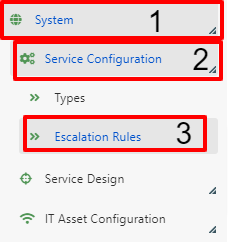
Go to System (1) > Service Configuration (2) > Escalation Rules (3).
-
Click the Add Rule button.

-
Fill in the fields as described below.
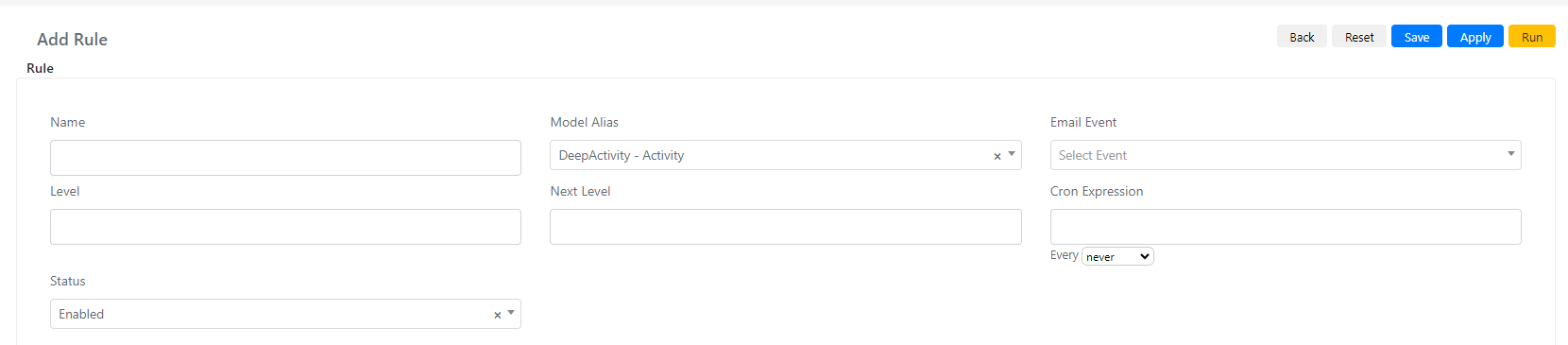
| Field | Value | Note |
|---|---|---|
| Name | Contract expiration | Can be changed. |
| Model Alias | DeepContract -- Contract | |
| Email Event | (leave empty for now) | Fill in after creating the event in Step 3. |
| Level | 0 | Can be changed. For more info see Escalation Rule Levels. |
| Next Level | 1 | Can be changed. For more info see Escalation Rule Levels. |
| Cron Expression | 0 * * * * | Runs every hour. |
| Status | Enabled |
-
Click Apply to save the rule.
-
After saving, query builder filters appear. Configure them as follows:
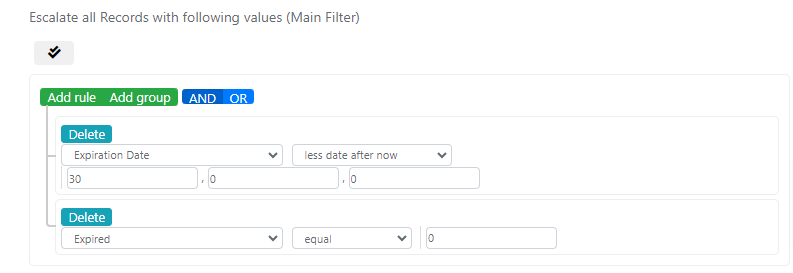
The configured filters are:
- Expiration Date less date after now 30,0,0 -- triggers 30 days before the contract expires.
- Expired equal 0 -- only processes contracts that have not expired.
Step 3: Create an Email Event
-
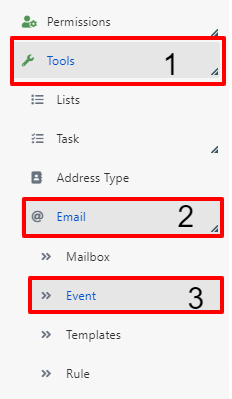
Go to System > Tools (1) > Email (2) > Event (3).
-
Click the Add Event button.

-
Fill in the required fields as described below.
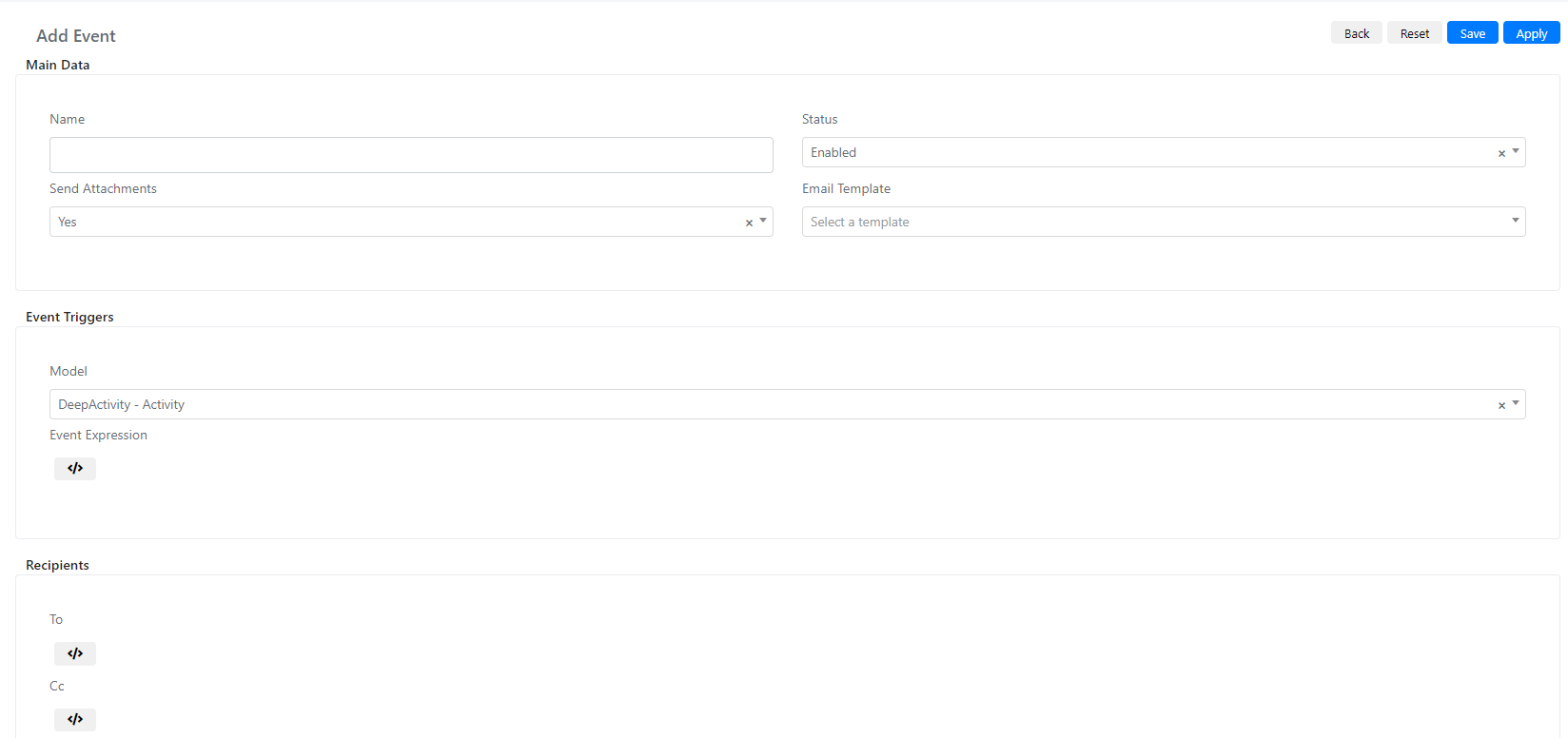
| Field | Value | Note |
|---|---|---|
| Name | Alert contract expiration | Can be changed. |
| Status | Enabled | |
| Email Template | Alert contract expiration -- [alert_contract_expiration] | Must match the template created in Step 1. |
| Model | DeepContract -- Contact |
Event Expression:
					if($this->getModel()->getExpirationDate()){
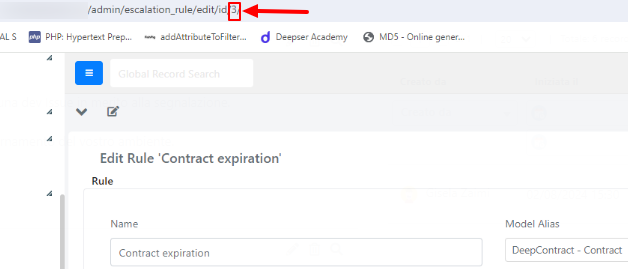
    if($this->getModel()->getId() && $this->getModel()->getData('escalation_rule') && $this->getModel()->getData('escalation_rule')['entity_id'] == 3){
        return true;
    }
    return false;
}
return false;
The value "3" represents the ID of the escalation rule. Replace it with the actual ID of your rule.
To:
$this->addTo('[email protected]');
Replace '[email protected]' with the email address you want to notify.
- Save the event by clicking Apply or Save.
Step 4: Link the Event to the Escalation Rule
Reopen the escalation rule created in Step 2 and set the Email Event field to the event you just created.
