Manage Additional Email Recipients via Email Rules
This guide explains how to create a custom email rule that stores all recipients of an email that generates a new Service Operation, and then adds them in CC to notifications during the Service Operation's life cycle. Two custom fields are created: one for registered Deepser users and another for unregistered email addresses.
Step 1: Create a Custom Field for Registered Users
Create a custom field in the DeepService - Operation model:
- Column Name: cust_operation_cc_registered
- Label: Additional Recipients
- Column Type: Don't create DB column
- Element Type: Userassociation
Step 2: Create a Custom Field for Unregistered Users
Create a custom field in the DeepService - Operation model:
- Column Name: cust_operation_cc_unregistered
- Label: Additional Recipients (Not Registered)
- Column Type: Text area
- Element Type: Textarea
Step 3: Create the Email Rule
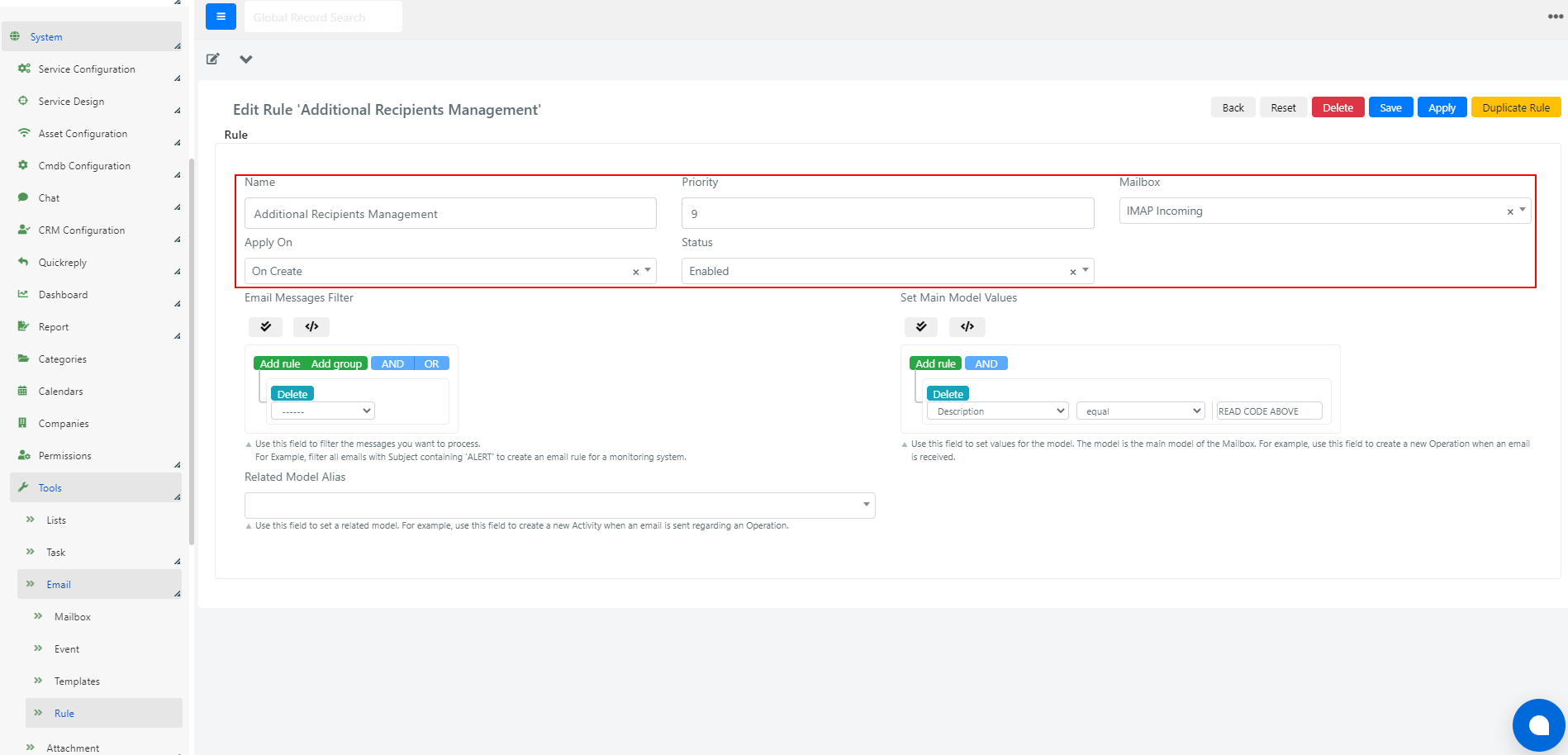
Create a new email rule with a name, priority (higher than any default rule), and status Enabled.
Set Apply On to On Create so the rule executes only for messages that do not belong to an existing thread.
Step 4: Configure the Email Rule
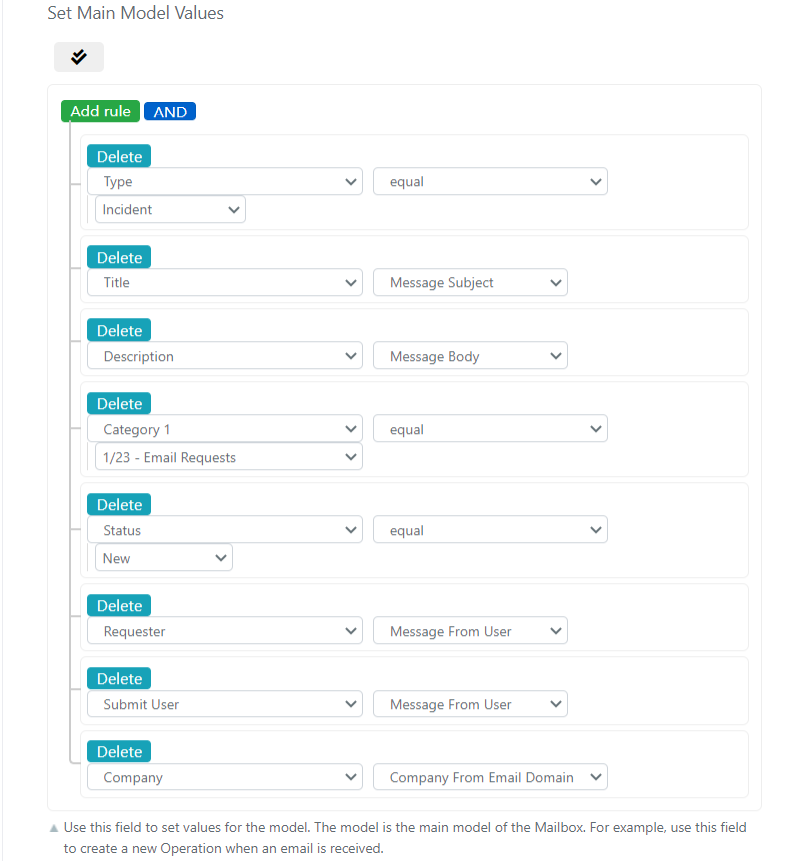
In the "Set Main Model Values" Query Builder, set the following values:
Insert the following PHP code in the Set Main Model Values scripting area to save additional recipients on the Service Operation custom fields:
					/**
 * Additional Recipient Management
 **/
//retrieve already parsed Tos
$to = Deep::helper('deep_util')->parseEmailString($this->getMessage()->getTo());

//retrieve already parsed Ccs
$cc = Deep::helper('deep_util')->parseEmailString($this->getMessage()->getCc());

if((!is_null($cc) && is_array($cc) && !is_null($to) && is_array($to) )) {
    //merge to and cc arrays, and change keys case
    $recipients = array_change_key_case(array_merge($to,$cc), CASE_LOWER);

    //exclude incoming mailboxes defined in deepser to avoid loops
    $mailboxCollection = Deep::getResourceModel('deep_email/mailbox_collection')
        ->addFieldToFilter('type',['eq' => 1]);

    foreach($mailboxCollection as $mailbox){
        if($mailbox->getUsername()){
            unset($recipients[strtolower($mailbox->getUsername())]);
        }
    }

    //manual exclusion other emailboxes that forward emails to deepser to avoid loops
    //unset($recipients['']);

    $ccUnregistered = [];
    $ccRegistered = [];

    //for each additional recipient determine if it is a registered user or not
    foreach($recipients as $recipient => $name){
        $user = Deep::getModel('deep_admin/user')->loadByEmail($recipient);
        if($user && $user->getId()){
            //populate userassoc array
            $ccRegistered [] = $user->getUsername();
        }
        else{
            //populate unregistered user array
            $ccUnregistered [] = $recipient;
        }
    }

    if(count($ccRegistered)){
        //populate the userassociation, that is the cust_operation_cc_registered field
        $this->getModel()->addUserAssociations('watch', $ccRegistered);
    }

    if(count($ccUnregistered)) {
        //populate the custom field cust_operation_cc_unregistered, adding email addresses separated by ;
        $this->getModel()->setData('cust_operation_cc_unregistered', implode(';', $ccUnregistered));
    }
}
If the user association is populated by a rule that does not modify the Service Operation or its associated entity, the user association will not be updated.