Manage Cache
This page explains how to manage the caching layer in Deepser, including how to flush cached content and monitor system resources. It is intended for Administrators who need to ensure changes are reflected immediately or troubleshoot performance issues.
Deepser uses a caching layer to improve application performance. Cached copies of pages, CSS, and other content are served statically, avoiding the need to regenerate them on every page load.
On some occasions, however, you may need to delete this cached copy to make changes visible immediately. For example, after adding a custom configuration or changing labels in Deepser, you should flush the cache rather than waiting for it to expire.
After changing labels, custom fields, or system configurations, always flush the cache so that changes appear immediately for all users.
Delete the Cache
To delete the cache in Deepser:
- Navigate to System > Cache Management.
- Choose the appropriate flush action (see the buttons described below).
The following screen will open:
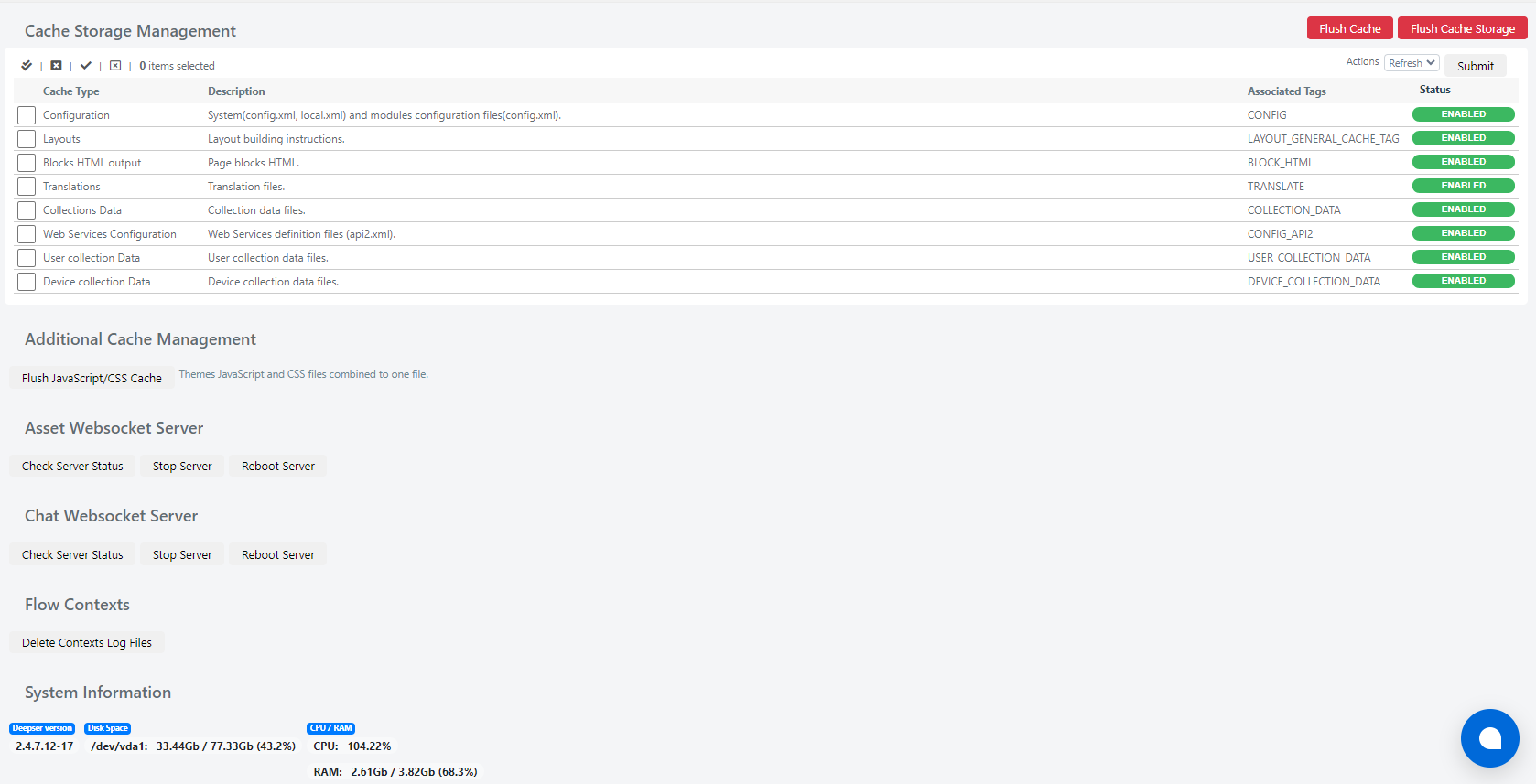
Cache Storage Management
This section contains all cache types available in Deepser, which you can enable, disable, or refresh.
You can use the following buttons in the top right corner of the form:
| Name | Description | Notes |
|---|---|---|
| Flush Cache | Deletes the cache of Deepser pages. | |
| Flush Cache Storage | Deletes the cache of both pages and content in Deepser, so everything will be reloaded. | When pressed, a confirmation popup appears where you need to click "OK" to proceed. |
| Action / Submit | Allows you to perform one of the following actions on the modules listed below: Refresh (reload the cache), Enable (enable the cache), Disable (disable the cache). |
Cache Type Explanation
Below is the complete list of available cache types and their meaning:

| Name | Description |
|---|---|
| Configuration | Cache of Deepser configuration files. |
| Layouts | Cache of Deepser layout files. |
| Blocks HTML output | Cache of HTML blocks generated by Deepser. |
| Translations | Cache of translations in Deepser. |
| Collections Data | Cache of Deepser collection files. |
| Web Services Configuration | Cache of Deepser web service configurations. |
| User collection Data | Cache of user data collections in Deepser. |
| Device collection Data | Cache of device collections in Deepser. |
Additional Cache Management
From this section you can act on CSS/JS cache in Deepser.
| Button | Description |
|---|---|
| Flush JavaScript/CSS Cache | Deletes the cache of CSS and JavaScript files used in the Deepser theme. |
Websocket Server Assets
From this section you can manage the websocket server for assets in Deepser.
| Button | Description |
|---|---|
| Check Server Status | Checks the status of the websocket server that distributes the assets in Deepser. |
| Stop Server | Stops the websocket server that distributes the assets in Deepser. |
| Reboot Server | Restarts the websocket server that distributes the assets in Deepser. |
Chat Websocket Server
From this section you can manage the chat websocket server in Deepser.
| Button | Description |
|---|---|
| Check Server Status | Checks the status of the websocket server that manages the chat in Deepser. |
| Stop Server | Stops the websocket server that manages the chat in Deepser. |
| Reboot Server | Restarts the websocket server that manages the chat in Deepser. |
Flow Contexts
From this section you can manage the flow context log in Deepser.
| Button | Description |
|---|---|
| Delete Context Log File | Deletes the flow log files, which allow you to see the progress of the flows (only if flows are enabled). |
System Information
From this section, you can view system information for the current server. The information you can check includes the following:
| Name | Description | Notes |
|---|---|---|
| Deepser Version | Shows the version of Deepser currently running. | At the time this document was created, the version was 2.4.7.12-7. |
| Disk Space | Indicates disk space usage on the /dev/vda1 partition, showing used space out of total space and the usage percentage. | This includes not only file storage but also the space used by the database. |
| CPU/RAM | Indicates the percentage of CPU resources currently in use, as well as used RAM out of total RAM including the usage percentage. |