Configure Inventory Warehouse Types
The Inventory Configuration module allows you to define and manage warehouse types within Deepser. An administrator can create new warehouse typologies that control how warehouses behave and appear throughout the system.
To access configuration, navigate to System > Inventory Configuration in the Deepser Backend.
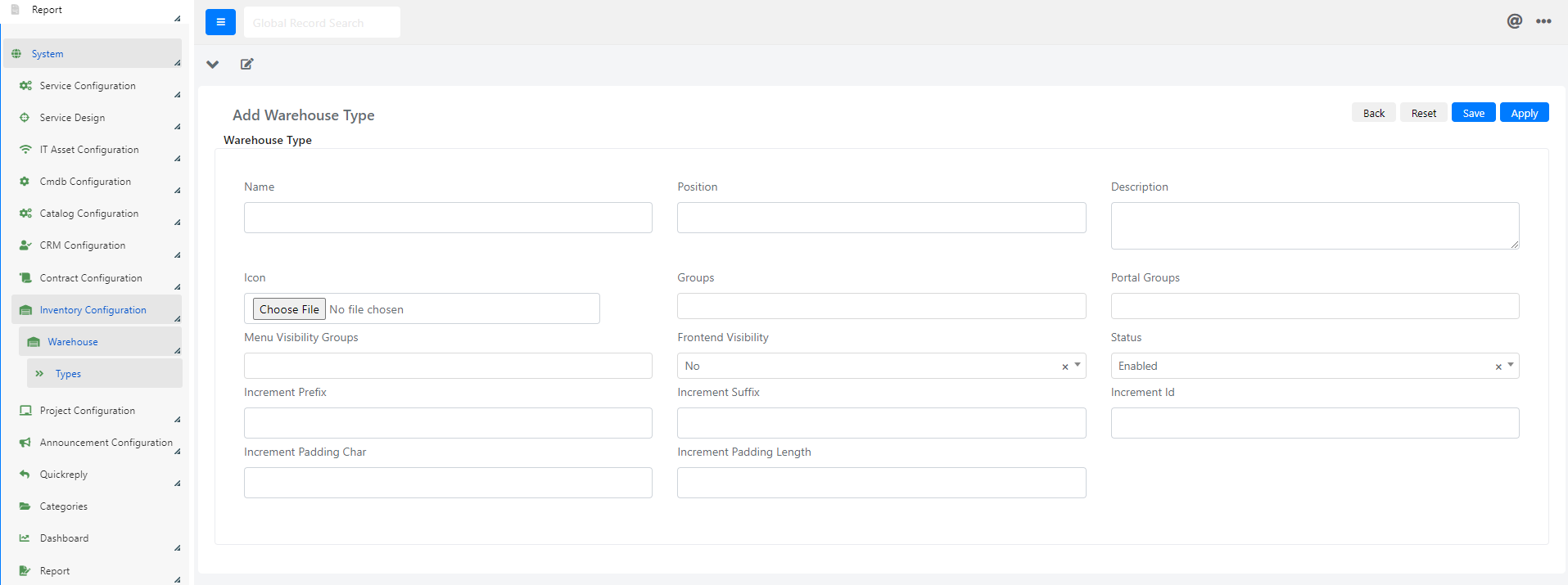
Configuration Fields
Below is the list of available fields and their meaning:
| Field | Description |
|---|---|
| Name | Identifies the warehouse name. This value also appears in the warehouse access menu on the left. |
| Position | Controls the display position of the item within the Deepser access menu. |
| Description | Descriptive field for the warehouse type. |
| Icon | Associates an icon with the warehouse type. |
| Groups | Specifies which groups have access to the warehouse type from the Deepser Backend. |
| Portal Groups | Specifies which groups have access to the warehouse type from the User Portal. |
| Groups Menu Visibility | Controls which groups can view the warehouse type item in the Deepser menu. |
| Frontend Visibility | Enables visibility of the warehouse type from the User Portal. |
| State | Enables or disables the warehouse type. |
| Incremental Prefix | Configures a prefix applied to warehouse numbering, enhancing the Incremental ID field in the warehouse main data. |
| Incremental Suffix | Configures a suffix applied to warehouse numbering, enhancing the Incremental ID field in the warehouse main data. |
| Incremental ID | Configures a base ID applied to warehouse numbering. |
| Incremental Padding Font | Configures a padding character applied to warehouse numbering. |
| Incremental Padding Length | Configures the length of the padding applied to warehouse numbering. |
tip
Use the Incremental Prefix, Suffix, and Padding fields together to create a clear and consistent numbering scheme for your warehouses, making them easier to identify at a glance.
Example: Numbering Scheme
If you set a prefix of WH-, an Incremental ID starting at 1, a padding character of 0, and a padding length of 4, your warehouses will be numbered WH-0001, WH-0002, and so on.