Manage Inventory Items
The Item entity allows you to create trackable products or assets, connect them to specific warehouses, and create movements linked to them. Each item represents a distinct inventory record within the system.
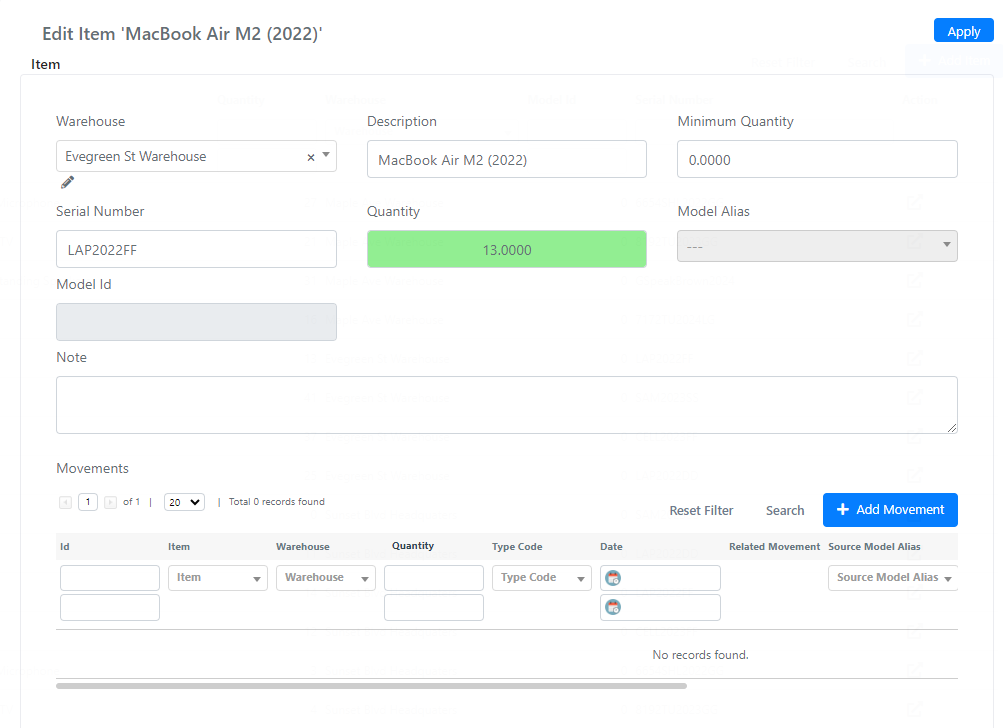
Item Fields
Below is the list of available fields on the Item entity:
| Field | Description |
|---|---|
| Warehouse | Select field used to link this item to a warehouse. |
| Serial Number | Text field for the item's serial number. |
| Quantity | Current available quantity of this item in your inventory. |
| Description | Text field for a name or description of the item. |
| Minimum Quantity | Threshold level below which you do not want this item's quantity to fall. |
| Note | Textarea field for additional notes. |
| Movements | Grid showing all movements related to this item. Click Add movement to create a movement directly. |
warning
Keep the Minimum Quantity field up to date. When the current quantity falls below this threshold, restock the item to avoid shortages.
Quick Movement Actions
You can quickly create movements for an item using the three action buttons on the items grid.

- The + button adds a movement of type load.
- The - button adds a movement of type unload.
- The arrows button adds a movement of type relocation.