Manage Inventory Movements
The Movement entity allows you to manage all item movements with actions such as load, unload, or relocation. Use this module to track quantity changes and relocations of items between warehouses.
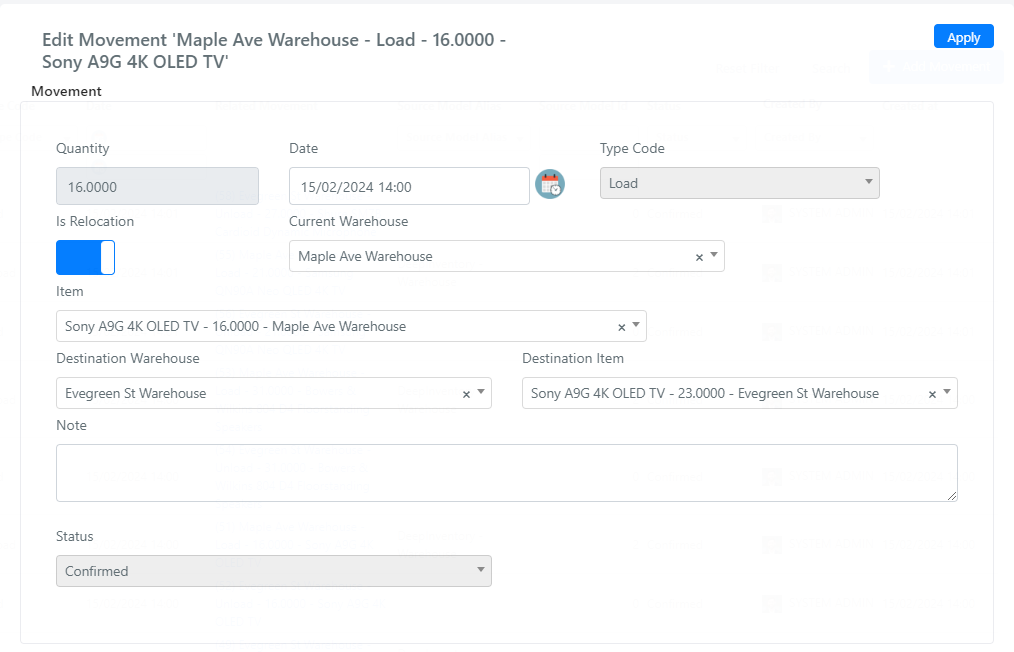
Movement Fields
Below is the list of available fields on the Movement entity:
| Field | Description |
|---|---|
| Quantity | The quantity of the item to load, unload, or transfer. |
| Date | Datetime field for the movement date. |
| Type Code | Select field with two options: load (adds to item quantity) and unload (subtracts from item quantity). |
| Is Relocation | Checkbox indicating whether the movement relocates an item from one warehouse to another. When set to Yes, the type code is automatically set to unload. |
| Warehouse | Source warehouse for this movement. |
| Item | The item this movement applies to. |
| Destination Warehouse | The destination warehouse, available when Is Relocation is set to Yes. |
| Destination Item | The destination item in the destination warehouse, available when Is Relocation is set to Yes. |
| Note | Textarea field for movement notes. |
| Status | Movement status: confirmed or pending. |
note
When you create a relocation movement, Deepser automatically sets the type code to unload for the source warehouse and creates a corresponding load entry in the destination warehouse.