Password Audit
Deepser provides a Password Audit feature to help you monitor password security and track usage across your organization. The audit log records all activities involving both public and private passwords, giving Operators a centralized view of credential access patterns.
Accessing the Password Audit Log
To access the password audit, follow these steps:
- Navigate to System > Tools > Log Viewer > Audit > Password in the Deepser Backend.
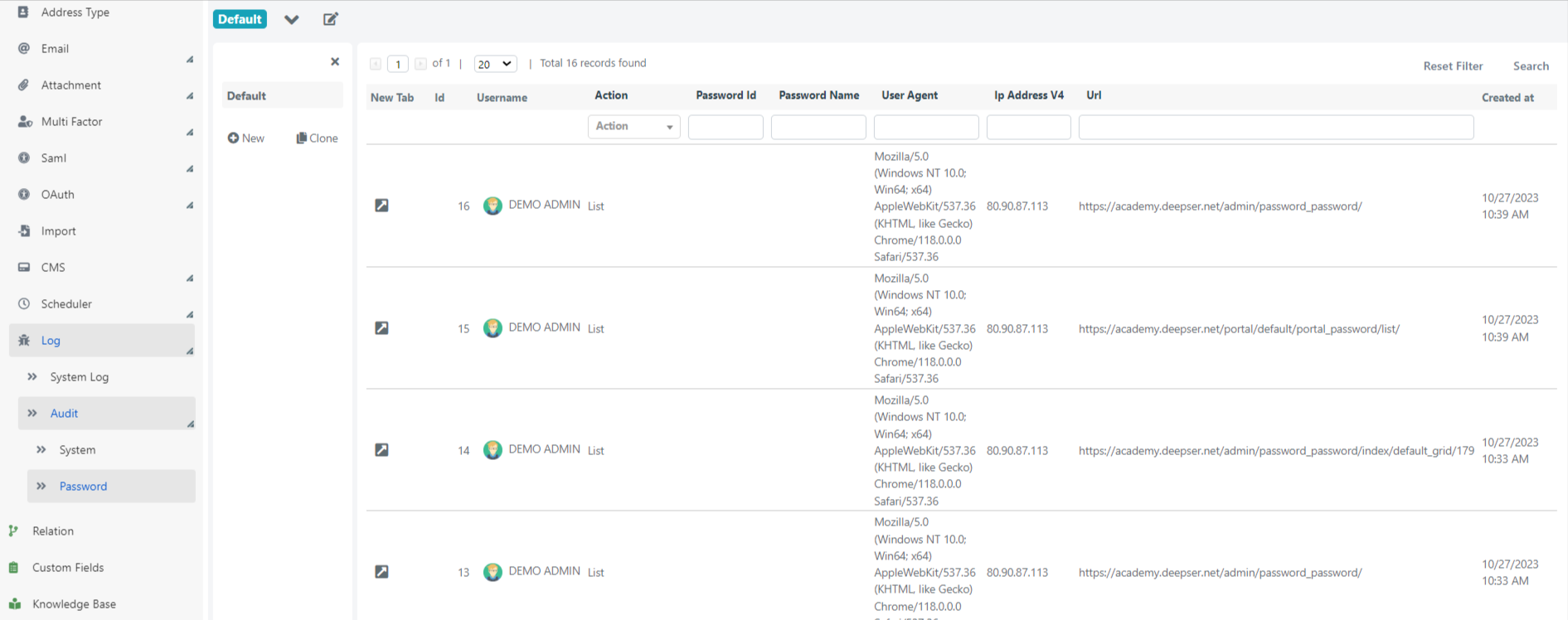
- The audit grid displays a chronological list of all password-related activities.
Tracked Information
For each password activity, Deepser records the following data:
| Field | Description |
|---|---|
| User Name | The user who performed the action. |
| Action | The type of action taken on the password (e.g., view, edit, delete). |
| User Agent | The browser or client used to access the password. |
| URL | The URL from which the password was accessed. |
| IP Address | The IP address of the machine used to perform the action. |
tip
Regularly reviewing the Password Audit log helps you identify unauthorized access attempts and maintain strong security practices.