Configure an Escalation Rule That Generates Other Entities
Escalation rules in Deepser can do more than modify field values -- they can also generate additional entities such as internal comments, related Service Operations, or activity logs. This guide shows how to configure an escalation rule that both modifies a Service Operation and creates an internal comment with contact details. It is intended for administrators who need escalation rules that go beyond simple field changes.
Scenario
Suppose you want to give high priority to all Service Operations whose requesting company is "Acme International" and automatically add an internal comment (not visible to end users) with quick contact information for the Operator handling the request.
Create the Escalation Rule
-
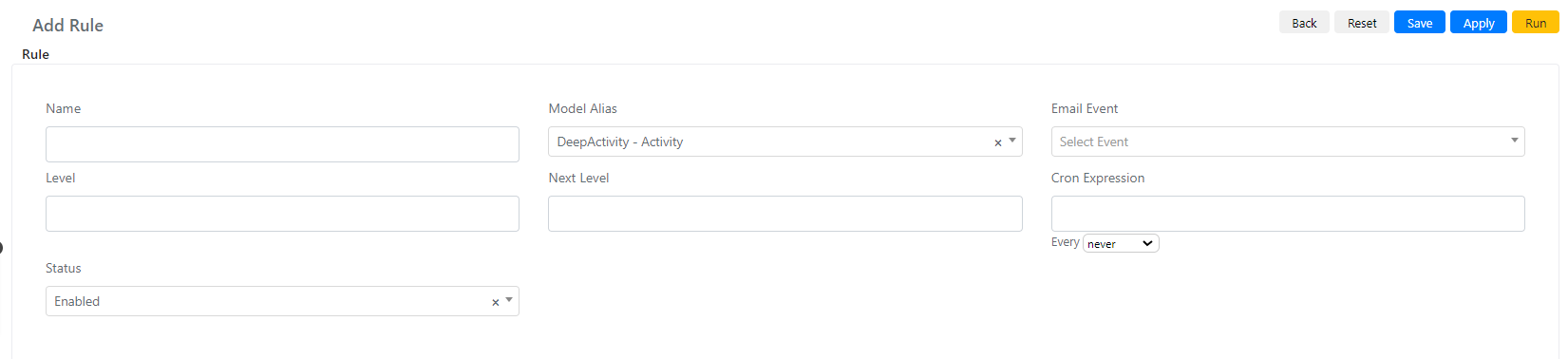
Navigate to System -> Service Configuration -> Escalation Rule and click Add Rule.
-
Set the Name to "High Priority Acme International and Load Primary Contact Information".
-
Set Model Alias to "DeepService -- Operation".
-
Set Level to 0 and Next Level to 1 so the rule processes each Service Operation only once.
-
Set the Cron Expression to every 5 minutes.
-
Click Save or Apply.
When several escalation rules are active simultaneously, pay close attention to how level changes interact between rules.
Configure the Query Builders
-
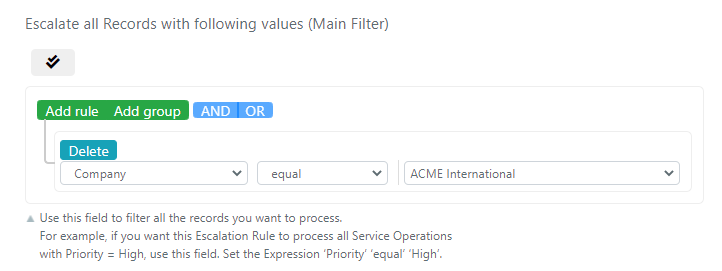
Configure the "Escalate all Records with following values (Main Filter)" query builder to match Service Operations from "Acme International":
-
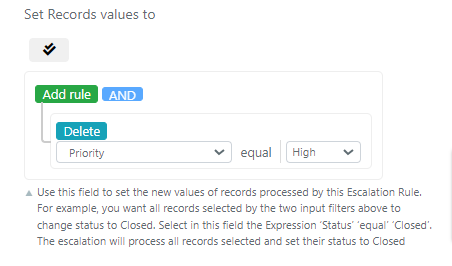
Configure the "Set Records values to" query builder to set the priority:
-
In the Output Section (Script) field, insert the following code to generate an internal comment with the primary contact's details:
$entityId = $this->getModelOutput()->getId();$company = $this->getModelOutput()->loadRequesterCompany();if($company && $company->getId()){$primaryContactUserName = $company->getData('primary_contact');$primaryContact = Deep::getModel('deep_admin/user')->loadByUsername($primaryContactUserName);if($primaryContact && $primaryContact->getId()){$primaryContactName = $primaryContact->getFirstname() . " " . $primaryContact->getLastname();$primaryContactEmail = $primaryContact->getEmail() ? $primaryContact->getEmail() : "" ;$primaryContactPhone = $primaryContact->getPhone() ? $primaryContact->getPhone() : "";$Description = nl2br("\n=================================================================\nNome Referente: {$primaryContactName}\nTelefono Referente: {$primaryContactPhone}\nEmail Referente: {$primaryContactEmail}\n=================================================================\n");$comment = Deep::getModel('deep_activity/activity');$comment->setPortalVisibility(0)->setType(1)->setModelId($entityId)->setModelAlias("deep_service/operation")->setDescription($Description)->setStatus(1)->save();}} -
Click Save or Apply.