Create an Escalation Rule Based on a Metric
Escalation rules in Deepser can be triggered by SLA metric thresholds, allowing automated actions when a Service Operation exceeds a defined time limit. This guide shows how to configure a metric-based escalation rule. It is intended for administrators who have already set up SLA metrics.
Scenario
Suppose you have a "Time to Respond" metric already configured with a start condition of status "New" and a stop condition of any status other than "New". You want to automatically set the priority to high if a Service Operation remains unassigned for more than 1 hour.
Create the Rule
-
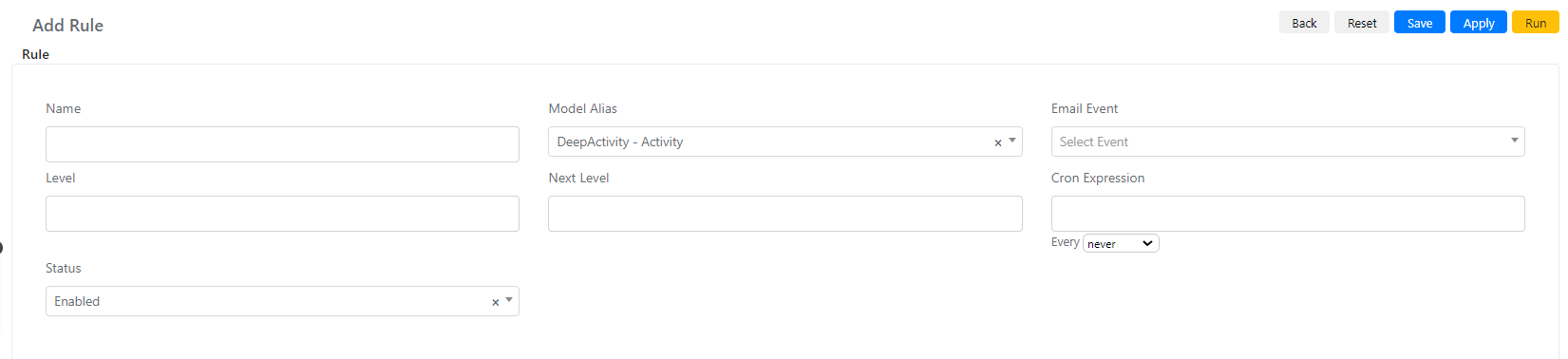
Navigate to System -> Service Configuration -> Escalation Rule and click Add Rule.
-
Set Name to "Set priority high for non-assigned Service Operation after 1 hour".
-
Set Model Alias to "DeepService -- Operation".
-
Set Level to 0 and Next Level to 1 so each Service Operation is processed only once.
-
Set the Cron Expression to every 5 minutes.
-
Click Save or Apply.
Configure the Query Builders
-
Configure the "Escalate all Records with following Timer values (applied after the Main Filter)" query builder to match the metric threshold:

-
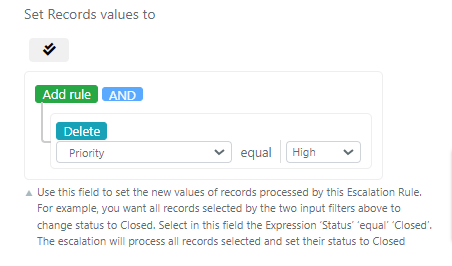
Configure the "Set Records values to" query builder to set the priority:
-
Click Save or Apply.