Configure an Escalation Rule That Modifies an Entity
Escalation rules can automatically modify field values on a Service Operation when specific conditions are met. This is useful for enforcing business policies -- such as raising priority for key customers -- without manual Operator intervention. This guide walks through a practical example and is intended for administrators setting up automated workflows.
Scenario
Suppose you want to automatically set the priority to high for all Service Operations whose requesting company is "Acme International". When the escalation rule runs, it evaluates every matching Service Operation and applies the configured field changes.
Create the Escalation Rule
-
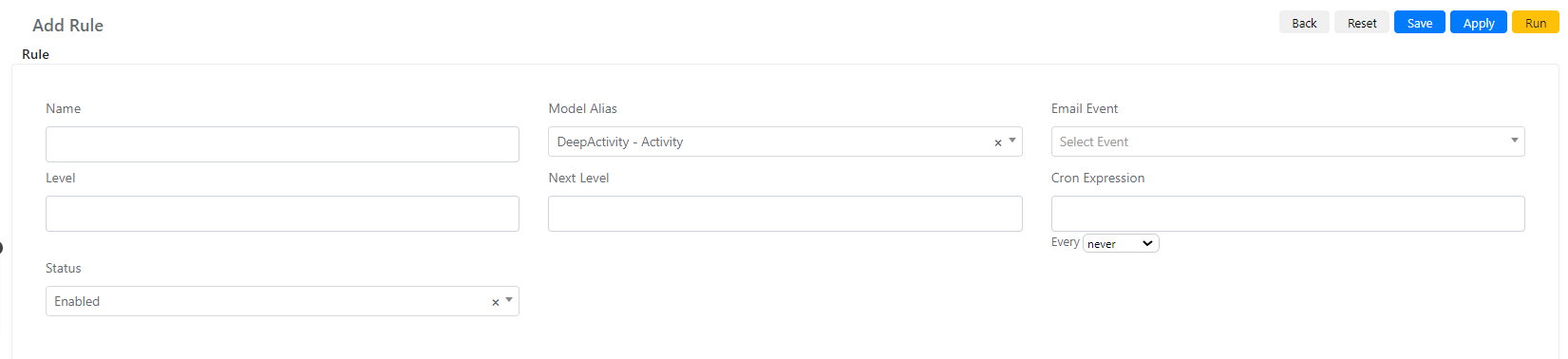
Navigate to System -> Service Configuration -> Escalation Rule and click Add Rule.
-
Set the Name to "High Priority Acme International".
-
Set Model Alias to "DeepService -- Operation".
-
Set Level to 0 and Next Level to 1 so each Service Operation is processed only once.
-
Set the Cron Expression to every 5 minutes.
-
Click Save or Apply.
Configure the Query Builders
-
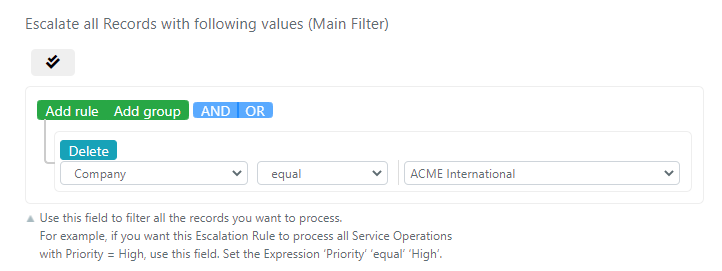
Configure the "Escalate all Records with following values (Main Filter)" query builder to match Service Operations from "Acme International":
-
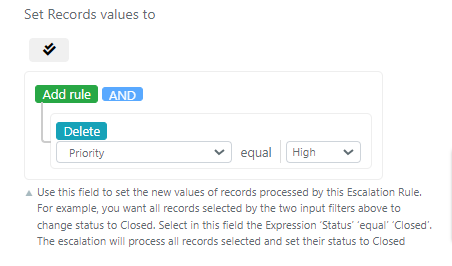
Configure the "Set Records values to" query builder to set the priority to high:
-
Click Save or Apply.