Configure Custom Events
Custom events allow you to attach server-side scripting logic to any entity in Deepser. You can configure them to run automatically when records are loaded, saved, or deleted.
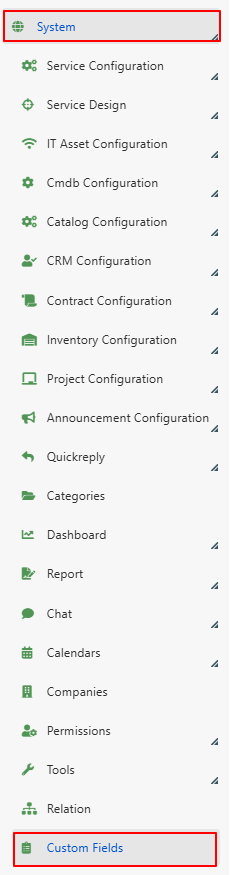
You can easily configure Custom Events through the path: System > Custom Fields.
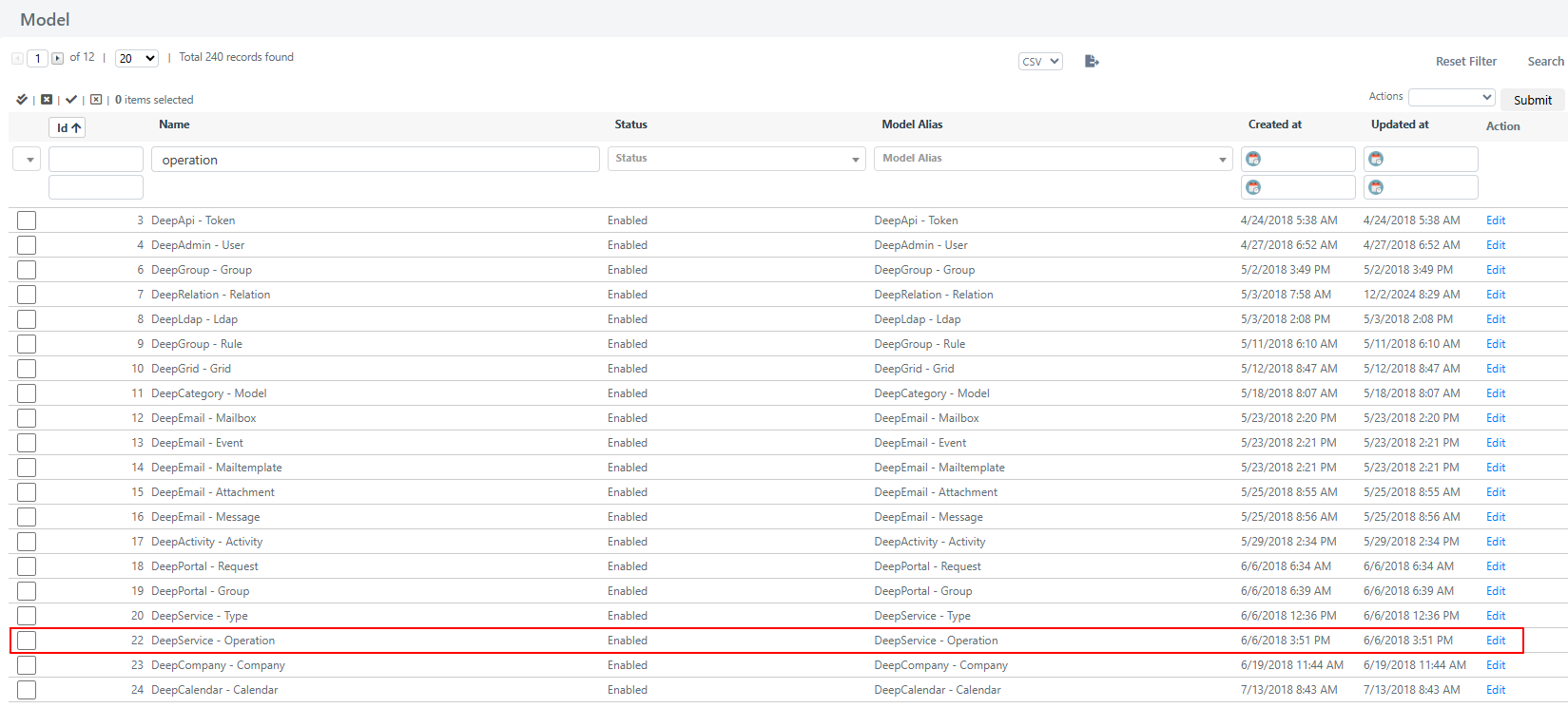
To view the custom events associated with a specific entity (for example, in the Service module, the "Operations" entity), select the corresponding row in the grid.
By accessing the module/entity you wish to modify, you will find the following tabs:
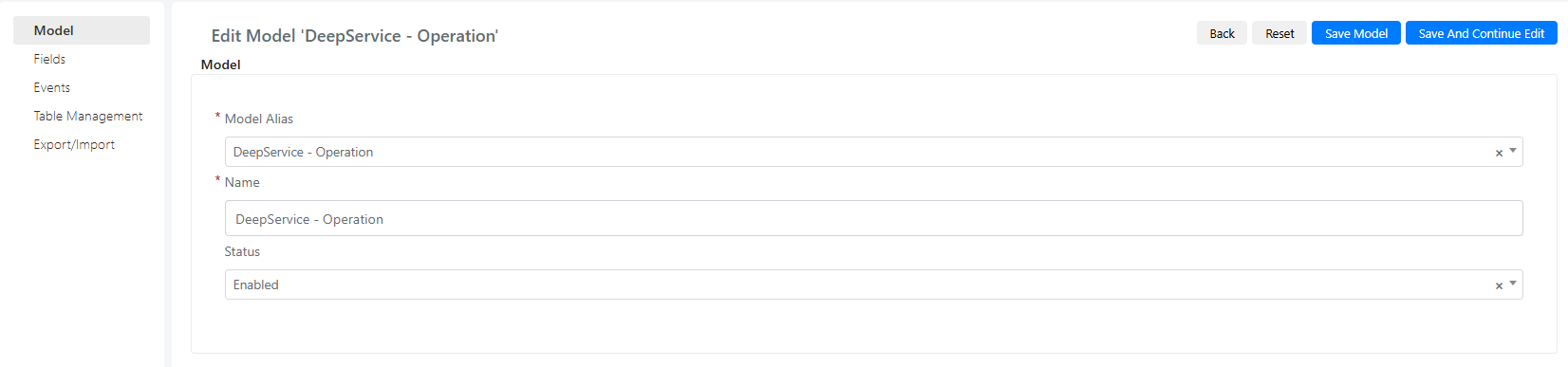
- Model: Contains the data of the model (or Module/Entity) being modified.
- Fields: Displays all custom fields created for the model, in addition to system fields.
- Event: Lists all custom events created for the specific model.
- Table Management: Allows direct management of the database table.
- Export/Import: Contains grids of both custom events and fields. Enables efficient import or export of events and fields for effective custom entity management.
Create a Custom Event
To create a new custom event, you define server-side logic that executes automatically at specific points in a record's lifecycle.
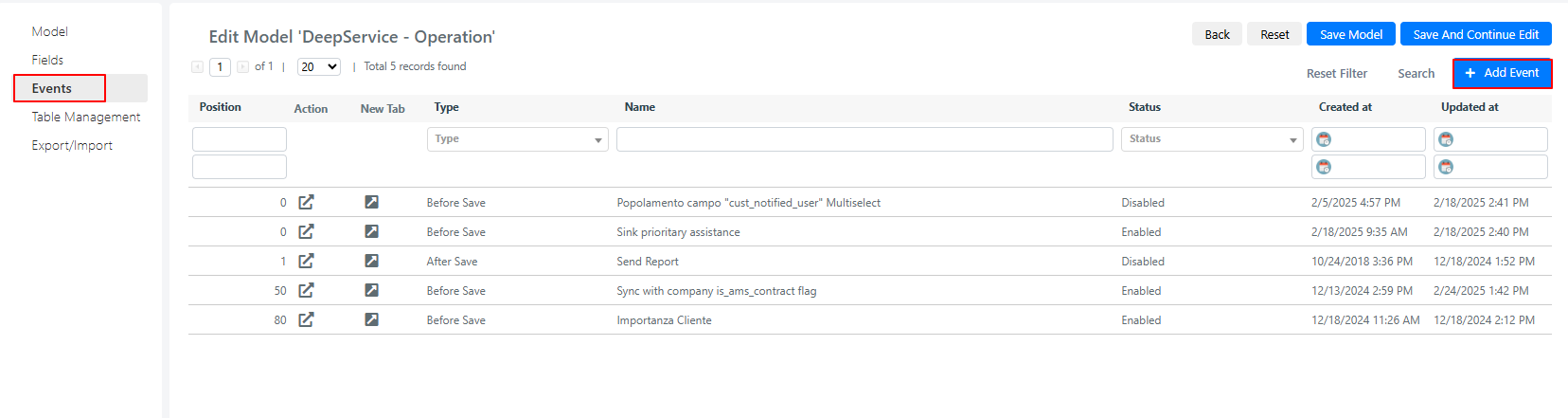
- Navigate to System > Custom Fields and select the entity you want to modify.
- Open the Events tab.
- Click the Add Event button in the top-right corner.
Once the event is created, the following screen will appear:
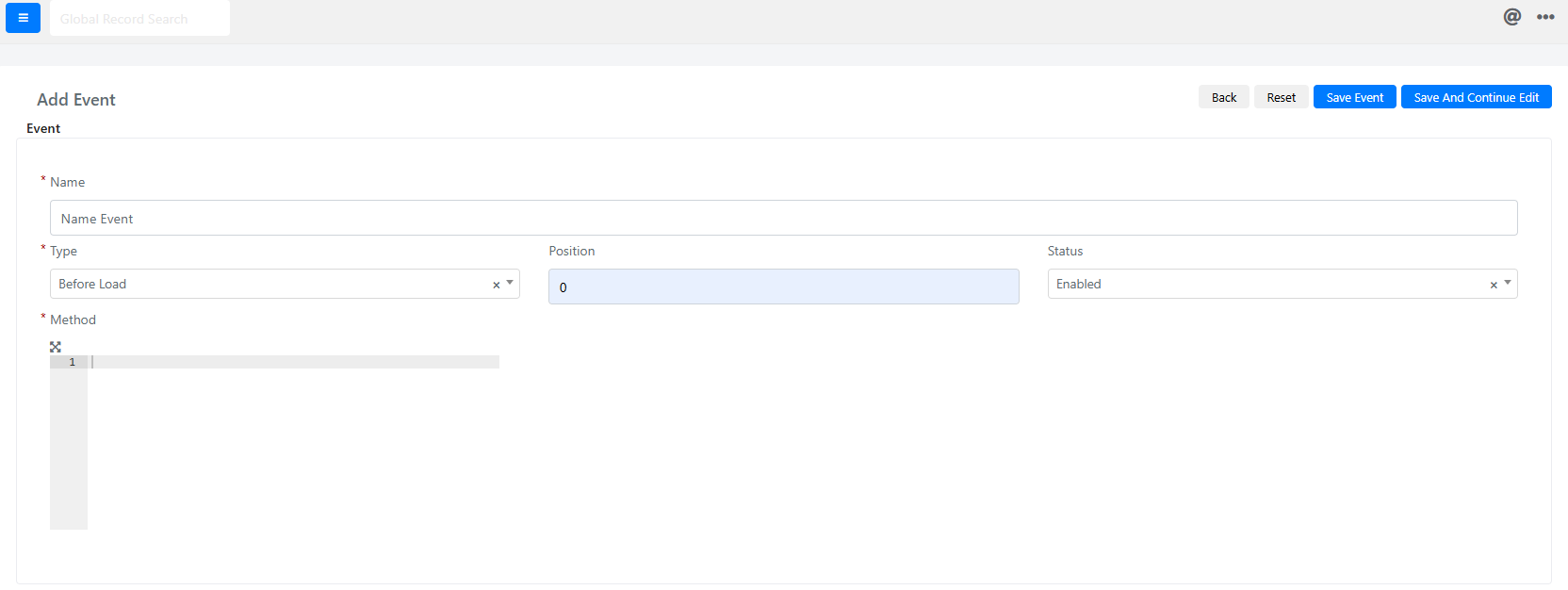
The fields displayed have the following meaning:
| Field | Description |
|---|---|
| Name | The name of the event being configured. |
| Type | The type of event (always executed server-side). Possible values: Before Load, Before Save, Before Delete, After Load, After Save, After Delete. |
| Position | Execution order of the event. Lower values run first. |
| Status | If enabled, the event will be triggered; otherwise, it will not. |
| Method | Field containing the PHP code to be executed for the selected event. |
Custom Event Types
Deepser supports several custom event types that execute at different stages of a record's lifecycle. The following sections explain each type with practical examples.
Before Save
Before Save events are executed before the model is saved to the database, following an ascending order based on the value of the position field.
A common use case is when, after an entity has been filled in, default values must be assigned before saving. The Before Save event can assign default values to empty fields or apply standard values under certain conditions.
Example: Before Save - Assigning Default Values
In the following example, a Before Save event is configured on the DeepService - Operation model. If the priority field of a new Service Operation is left empty and the selected category is Network, the event automatically sets the priority to High.
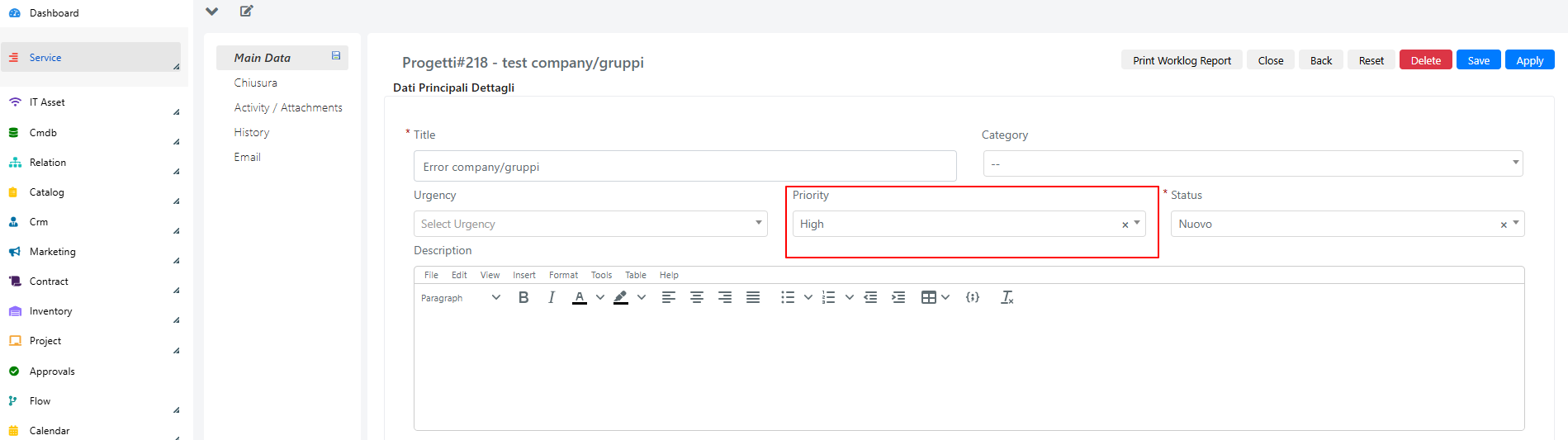
The code is inserted in the "Method" scripting area under: System > Custom Fields > Events Tab.
/* Test that the current model instance is new */
if($this->isObjectNew()){
    /* Test that the priority field is not filled in, that the type is Incident, and that the selected category is Network */
    if(!$this->getPriorityId() && $this->getTypeId() == 1 &&  $this->getCategory1() == 5){
        /* In this case, the Priority field is set to High */
        $this->setPriorityId(2);
    }
}
After Save
After Save events are executed after the model has been saved in the database, in ascending order based on the position field.
These events are useful when you need to ensure that an object has been saved before performing a configured action. A typical use case involves using the newly generated ID of a record to create a foreign key relationship with another entity.
Example: After Save - Assigning Company Id to an Associated User
In this example, an After Save event is configured in the DeepCrm - Contact model. After a contact is saved, the event assigns the related company's ID to the associated user's CompanyId field.
Below is the code implemented in the Method scripting area, accessible via the path: System > Custom Fields > Events Tab.
// Checks whether there is an Account ID associated with the current object
if($this->getAccountId()){
    // Load the Account object using the loadAccount() method
    $account = $this->loadAccount();
    // From the loaded Account, retrieve the related Company object
    $company = $account->loadCompany();
    // Load the associated User object using the loadUser() method
    $linkedUser = $this->loadUser();

    // Set the ID of the Company loaded in the User as CompanyId
    $linkedUser->setCompanyId($company->getId());
    // Save changes to the user object
    $linkedUser->save();
}
Before Delete
Before Delete events are executed before a record is deleted from the database and from Deepser. These events follow an ascending order determined by the value of the position attribute.
A frequent use case for a Before Delete custom event is the need to delete any references present in other entities related to the record being deleted, or to log the deletion within a dedicated log file.
Example: Before Delete - Logging Record Deletion
In this example, a Before Delete event is configured in the DeepService - Operation model. It logs the deletion of a Service Operation in a dedicated log file. The code is written in the "Method" scripting area under: System > Custom Fields > Events Tab.
/* Retrieve the username of the current user */
$currentUsername = Deep::helper('deep_admin')->getCurrentUser()->getUsername();
/* In Before Delete type events the $this object does not contain the full instance of the
 object but only the 'entity_id' attribute. For this reason the instance of the current object is loaded,
 i.e. the one that is about to be deleted, via the load method of the deep_service/operation model */
$operation = Deep::getModel('deep_service/operation')->load($this->getId());
/* The string with Title, ID, and user is formed and will be added to the log */
$logString = 'ID ticket: '. $this->getId() . ' | Titolo: ' . $operation->getTitle(). ' | Utente: '. $currentUsername;
/* Via the static log method of the Deep class the $logString is added to the file
 'Ticket_Eliminated.log'. If this file does not exist it will be created. */
Deep::log($logString, null, 'Ticket_Eliminati.log');
Note: In Before Delete events, the $this object only contains the entity_id attribute. You must explicitly load the full model instance if you need access to other fields.
After Delete
After Delete events are executed after a record has been removed from the database and from Deepser, following an ascending order based on the position field.
A common use case involves updating or removing references after the deletion of a specific record.
Example: After Delete - Updating the Status of a Device Linked to a Deleted User
In this example, an After Delete event is configured in the DeepAdmin - User model. The event updates the status of a device that was associated with the deleted user.
Below is the code implemented in the Method scripting area, accessible via the path: System > Custom Fields > Events Tab.
// Create a collection of devices
$deviceCollection = Deep::getResourceModel('deep_cmdb/ci_collection');
// Add a filter to display only ci = Device
$deviceCollection->addFieldToFilter('class_id', ['eq' => 2]);
// Add a filter to the collection to select only devices associated with a given username
$deviceCollection->addFieldToFilter('cust_utente_assegnatario', $this->getUsername());
// Iterate through each device in the filtered collection
foreach ($deviceCollection as $device) {
    // Set the status of the device as 0 = inactive
    $device->setData('status', 0);
    // Save changes made to the device
    $device->save();
}
Best Practices
ID Availability
In Before Save events, the entity_id for new objects will only be available after the record is saved.
If you need to reference the entity_id of a newly created record, use an After Save event instead of a Before Save event.
Avoid Infinite Loops
Incorrect configuration of Before Save or After Save events can lead to infinite loops, causing memory consumption to grow until it reaches the system limit.
Below is an example of code inserted in an After Save event that would generate an infinite loop:
/* Incorrect code that would cause a loop */
$linkedId = $this->getCustAssociatedOperation();
if($linkedId){
    $linkedOperation = Deep::getModel('deep_service/operation')->load($linkedId);
    $linkedOperation->setCustAssociatedOperation($this->getId());
    $linkedOperation->save();
}
Below is the corrected version, which includes an appropriate check to prevent unintended loops:
/* Corrected version that avoids unintentional loop triggering */
$linkedId = $this->getCustAssociatedOperation();
if($linkedId){
    $linkedOperation = Deep::getModel('deep_service/operation')->load($linkedId);
    /* Check needed so that the associated Service Operation instance save event does not
 trigger an event loop */
    if(!$linkedOperation->getCustAssociatedOperation()) {
        $linkedOperation->setCustAssociatedOperation($this->getId());
        $linkedOperation->save();
    }
}
Always include a guard condition when saving related records inside a save event to prevent infinite recursion.
Related Articles
- Use the Flow Designer -- Build automated workflows with the visual designer
- Workflow Actions -- Available action blocks including Script