Workflow Overview
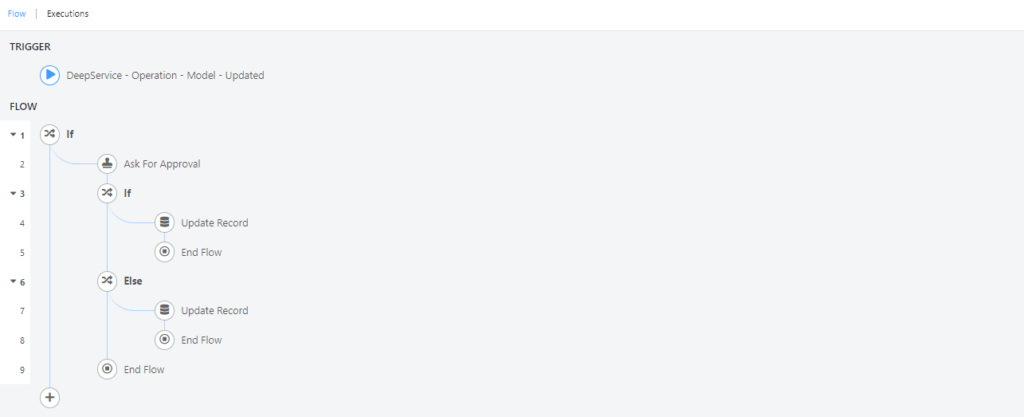
Based on the ITIL framework, a service request or a change request can trigger the generation of a workflow. A workflow is the sequence of steps involved in moving from the beginning to the end of a working process. This page provides a high-level overview of how workflows function in Deepser and what modules are involved.
Key Modules
Deepser provides two primary modules for building workflows:
- Flow Designer -- The visual drag-and-drop interface where you define triggers, actions, and logic blocks to automate business processes. See Flow Designer for details.
- Approvals -- A dedicated module for managing approval requests that can be triggered by flows. Approvals can be handled through the Deepser Backend or the User Portal. See Backend Approval Structure and Portal Approval Structure for details.
How Workflows Operate
A typical workflow in Deepser follows this pattern:
- A trigger starts the flow -- for example, when a Service Operation is created or updated.
- Logic blocks (IF, ELSE, FOREACH, WHILE) evaluate conditions and direct the flow along different branches.
- Actions perform operations such as creating records, sending emails, or requesting approvals.
- Stages optionally track the progress of the workflow through defined phases.
For example, when an Operator opens an "Access Management" Service Operation, a flow can automatically request approval from the assigned group, check the approval result, and update the Service Operation status accordingly.
Related Articles
- Flow Designer -- Create and manage workflows
- Flow Triggers -- Configure trigger conditions
- Workflow Logic -- Use conditional and loop blocks
- Workflow Actions -- Available action types
- Workflow Samples -- Complete configuration examples
- Workflow Executions -- Monitor workflow runs
- Stage Set -- Divide workflows into stages
- SubFlow -- Create reusable workflow components